AutoML (Automated Machine Learning) is a technology that automates the process of building machine learning models. It handles tasks like data preprocessing, feature selection, model selection, and hyperparameter tuning, making machine learning more accessible and faster for users without deep expertise.
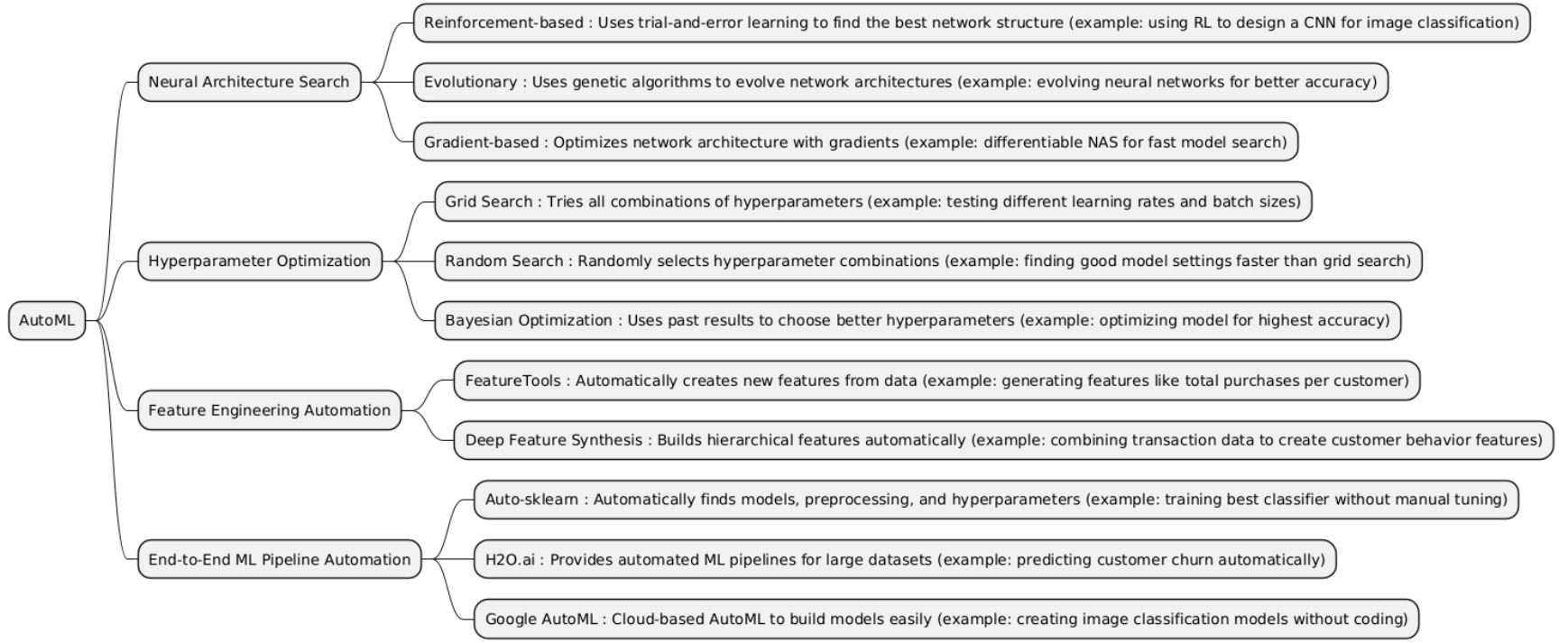
| Type | What it is | When it is used | When it is preferred over other types | When it is not recommended | Examples of projects that is better use it incide him |
|---|---|---|---|---|---|
| NAS | Neural Architecture Search (NAS) is an AutoML technique that automatically designs the best neural network architecture (layers, connections, operations) for a specific task instead of relying on manual design by humans. | Used when you need high-performance neural networks but want to avoid manual trial and error in architecture design. Often applied in computer vision, NLP, or speech recognition tasks. |
• Better than Hyperparameter Optimization when the challenge is model structure, not just tuning values. • Better than Feature Engineering Automation when the model can learn representations automatically (e.g., images or raw text). • Better than End-to-End ML Pipeline Automation when the core bottleneck is finding the best deep architecture. |
• Not advised when you have limited computation, since NAS requires training and evaluating many candidate models. • Not ideal for simple datasets or tabular data where traditional models already perform well. • Avoid when interpretability or quick experimentation is more important than marginal accuracy gains. |
• Image classification system that uses NAS to automatically discover the best CNN architecture (e.g., NASNet). • Speech recognition project where NAS finds the optimal RNN or Transformer variant. • Edge AI optimization, where NAS searches for the most efficient model for deployment on mobile or IoT devices. |
| HPO | Hyperparameter Optimization (HPO) is an AutoML technique that automatically finds the best hyperparameters (like learning rate, batch size, number of layers, etc.) for a model to maximize performance. | Used when you already have a defined model architecture but want to tune its parameters to get the best possible accuracy, efficiency, or generalization. |
• Better than Neural Architecture Search (NAS) when the model structure is fixed and only parameters need tuning. • Better than Feature Engineering Automation when data is already well-prepared and the main challenge is model optimization. • Better than End-to-End ML Pipeline Automation when you want fine-grained control over model performance tuning. |
• Not advised when the model architecture is unknown or weak, since tuning cannot fix poor design. • Avoid when computational resources are very limited, as methods like Bayesian Optimization or Grid Search can be expensive. • Not useful for simple models (e.g., linear regression) where few hyperparameters exist. |
• Optimizing a BERT model for sentiment analysis using Bayesian optimization. • Tuning XGBoost hyperparameters for credit risk prediction. • Finding best learning rate and dropout for a CNN in an image classification task. |
| Feature Engineering Automation | Feature Engineering Automation is an AutoML technique that automatically creates, selects, or transforms features from raw data to improve model performance without human intervention. | Used when you have raw or complex data (text, time series, tabular, logs, etc.) and need to extract useful patterns or variables automatically before training. |
• Better than Hyperparameter Optimization when the quality of features limits model performance more than tuning parameters. • Better than Neural Architecture Search (NAS) when model structure isn’t the issue, but data representation is. • Better than End-to-End ML Pipeline Automation when you want to focus only on improving data inputs while keeping control over the rest. |
• Not advised when features are already well-engineered by domain experts. • Avoid when data is small or simple, as automation may overfit or create useless features. • Not ideal when interpretability is critical, since generated features can be hard to explain. |
• Predicting loan defaults by automatically generating interaction features from customer data. • Time-series forecasting where lag, trend, and rolling mean features are automatically created. • Text classification with automated extraction of TF-IDF, n-grams, and embeddings. |
| End-to-End ML Pipeline Automation | End-to-End ML Pipeline Automation is an AutoML approach that automatically handles the entire machine learning workflow: data preprocessing, feature engineering, model selection, hyperparameter tuning, and evaluation, producing a ready-to-deploy model with minimal human intervention. | Used when you want to fully automate ML development, especially in business or large-scale projects where speed and efficiency are more important than manual fine-tuning. |
• Better than Neural Architecture Search when you need complete automation, not just model design. • Better than Hyperparameter Optimization when tuning alone isn’t enough. • Better than Feature Engineering Automation when you want all steps automated, including modeling and deployment. |
• Not advised when you require full control or interpretability of each step. • Avoid for small or very specialized datasets where human expertise can outperform automation. • Not ideal if resources are limited, as full pipeline automation can be computationally intensive. |
• Automated customer churn prediction pipeline that ingests raw CRM data and outputs a trained, optimized model. • Fraud detection system where raw transaction logs are processed and a model is deployed automatically. • Automated image classification service that handles preprocessing, model selection, and tuning end-to-end. |
import numpy as np
import random

# --- Search Space ---
# Hidden layer sizes to choose from
architectures = [4, 8, 16, 32]

# Q-table for RL (states = previous architecture, actions = next architecture)
Q = np.zeros((len(architectures), len(architectures)))

# RL Hyperparameters
alpha = 0.1   # learning rate
gamma = 0.9   # discount factor
epsilon = 0.2 # exploration rate
episodes = 50

# Simulated reward function (higher hidden units = usually better accuracy)
def get_reward(hidden_units):
    return hidden_units / max(architectures) + np.random.randn() * 0.05  # add small noise

for episode in range(episodes):
    state = random.randint(0, len(architectures)-1)
    done = False

    while not done:
        # Epsilon-greedy action
        if random.uniform(0, 1) < epsilon:
            action = random.randint(0, len(architectures)-1)
        else:
            action = np.argmax(Q[state])

        # Get reward for chosen architecture
        reward = get_reward(architectures[action])

        # Update Q-table
        Q[state, action] += alpha * (reward + gamma * np.max(Q[action]) - Q[state, action])

        state = action
        done = True  # one-step episode for simplicity

# Show learned Q-table
print("Learned Q-table:\n", Q)

# Pick best architecture
best_idx = np.argmax(np.max(Q, axis=1))
best_architecture = architectures[best_idx]
print("Best architecture (hidden units):", best_architecture)
# Install scikit-optimize if not installed
# !pip install scikit-optimize scikit-learn

from skopt import gp_minimize
from skopt.space import Real, Integer
from sklearn.datasets import load_iris
from sklearn.model_selection import cross_val_score
from sklearn.ensemble import RandomForestClassifier
import numpy as np

# --- Load data ---
X, y = load_iris(return_X_y=True)

# --- Define objective function to minimize ---
# We want to maximize accuracy, so we minimize negative accuracy
def objective(params):
    n_estimators, max_depth = params
    model = RandomForestClassifier(n_estimators=n_estimators, max_depth=max_depth, random_state=42)
    acc = cross_val_score(model, X, y, cv=3).mean()
    return -acc  # minimize negative accuracy

# --- Define search space ---
space  = [
    Integer(10, 200, name='n_estimators'),
    Integer(1, 10, name='max_depth')
]

# --- Run Bayesian Optimization ---
res = gp_minimize(objective, space, n_calls=20, random_state=42)

# --- Show results ---
print("Best hyperparameters:")
print(f"n_estimators: {res.x[0]}, max_depth: {res.x[1]}")
print(f"Best accuracy: {-res.fun:.4f}")
# Install Auto-sklearn if not installed
# !pip install auto-sklearn

import autosklearn.classification
from sklearn.datasets import load_iris
from sklearn.model_selection import train_test_split
from sklearn.metrics import accuracy_score

# --- Load dataset ---
X, y = load_iris(return_X_y=True)
X_train, X_test, y_train, y_test = train_test_split(X, y, test_size=0.3, random_state=42)

# --- Create Auto-sklearn classifier ---
automl = autosklearn.classification.AutoSklearnClassifier(
    time_left_for_this_task=60,   # seconds
    per_run_time_limit=20,        # seconds per model
    seed=42
)

# --- Train AutoML pipeline ---
automl.fit(X_train, y_train)

# --- Predict and evaluate ---
y_pred = automl.predict(X_test)
acc = accuracy_score(y_test, y_pred)

print("Predictions:", y_pred)
print("Accuracy:", acc)

# --- Show selected models ---
print("Models chosen by Auto-sklearn:")
print(automl.show_models())